Published on Jan 28, 2025
Recently, I had to check hundreds of checkboxes to proceed with my work and the website didn't expose any API that I could leverage to make my life easier. Being a proper lazy developer who doesn't want to click hundreds of times using mouse and potentially missing some of the buttons, I got an idea involving Javascript and developer console.
Developer console
Every modern browser comes with a development console and let's you inspect the contents of a webpage, run some javascript, inspect network traffic, etc... It can probably do things I've never heard of, but even for web developer newbies such as myself it's pretty useful tool.
Since I am using Firefox, everything related to the development console will be referred to with regard to Firefox. I suppose it works similarly in other browsers too. The Firefox' official documentation can give good idea.
Javascript
Javascript was created to execute code from a webpage on your local device. It's power lies especially at manipulating the webpage content based on users' action. There's long history to Javascript and I know close to nothing about it, so I'll just refer to some documentation.
Putting it all together
Let's assume we have a website that has some checkbox like this:
And our task is to check the box programmatically.
First let's open the development console using F12. In the 'inspector' section, after expanding couple of the first enclosing tags, we can see something like this:
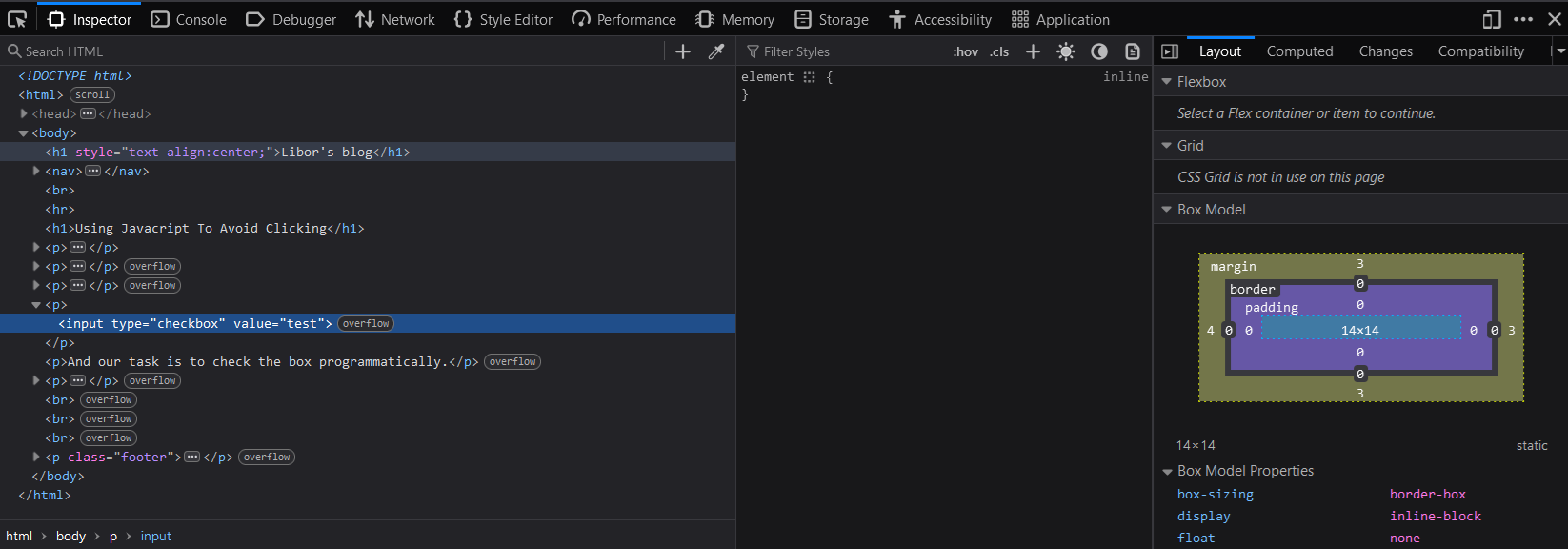
Alright, so the checkbox has value of test. We can use Javascript's querySelectorAll to select all elements matching our selector. In our case we can run this:
document.querySelectorAll('input[type="checkbox"]')To run it, switch tab in your console to 'Console', paste the above code and hit enter. You should see something like this

When you click the input on the next line, it actually points you to the checkbox in the html code in the 'Inspector' tab.
Now to check the checkbox, we need to do moore than just finding it. According to the documentation, the box is checked when its property checked is true. Let's code that:
document.querySelectorAll('input[type="checkbox"]')
    .forEach(checkbox => {checkbox.checked = true})
Run this in this console and also check visually that now the checkbox really is checked!
To make sure we select only the checkboxes we really want, we can further refine the query to include other attributes too. For example, since our checkbox has value equal to test, we can (and should) include that too:
document.querySelectorAll('input[type="checkbox"][value="test"]')
    .forEach(checkbox => {checkbox.checked = true})
This was fun. Instead of performing gazillions of boring mouse clicks I learnt a bit of a Javascript and mainly had fun doing that. This follows the notoriously famous "Automate the boring stuff" or "When you have to do something twice, take a look to see if that can be automated. That extra time can pay off as there's a good chance you'll have to do it yet again.".